Punchbowl: Invites & eCards
- 4.8
- Rating
- 1.00M
- Installs
- Free
- Price

 Analysis by App-foxy
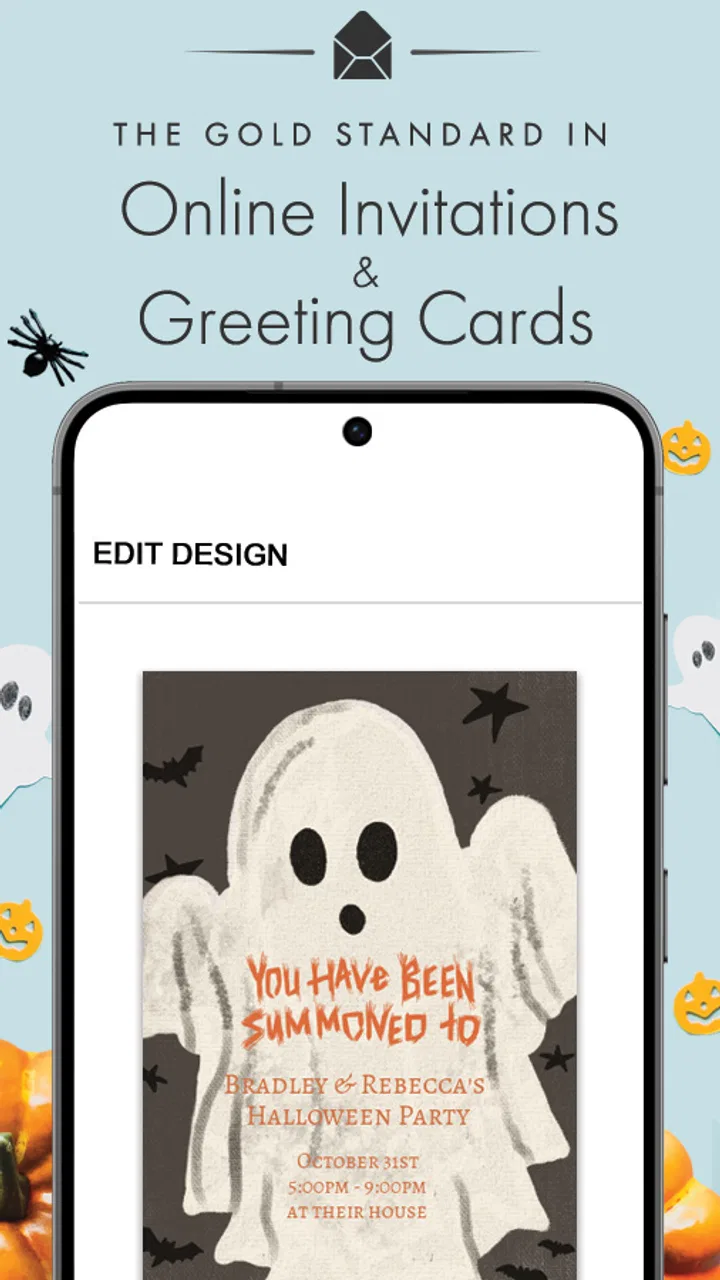
I usually judge invitation apps by one simple question: do they help me get an event organized without turning the process into another project? Punchbowl: Invites & eCards is built around that practical idea. It is a free lifestyle app from Punchbowl for creating and sending digital invitations and ecards from a mobile device, and its strongest quality is the way it puts a normally desktop-heavy task into a quick, phone-friendly workflow.
That focus matters because invitations are rarely created when I am sitting comfortably at a computer with plenty of time. More often, I am arranging a birthday gathering between errands, sending a thank-you card after remembering it late, or trying to get a group on the same page while plans are still changing. In those moments, a dedicated invitation tool can feel more useful than a general messaging app, even though messaging is often faster for a very small group.
After using it as an everyday planning tool, I see Punchbowl as a good fit for people who want something more intentional than a plain text message but less demanding than designing a complete event page. It is not the right answer for every kind of gathering, and the in-app purchase range means the free experience should be checked carefully before committing to a particular design or extra. Still, the central promise is clear: make a polished invitation or ecard without needing a separate computer workflow.
You May Also Like

 Blood Strike: 2.5 Anniversary
Blood Strike’s Loadouts Turn Every Drop Into a Tactical Gamble
A close look at Blood Strike’s custom loadouts: how fast access to signature weapons reshapes its battle royale rhythm, rewards preparation, and narrows the gap between fights.

 Pandora - Music & Podcasts
Pandora’s Music Is Easy to Start, but Harder to Recover
Pandora’s strength is its low-effort path from a seed to a station. Its weak spot is how much confidence it asks you to place in connection, setup, and quiet recovery.

 8 Ball Pool
 Is Built on Rivalries, Rematches, and Routine
A close look at the rivalries, rematches, shared routines, and unanswered safety questions that turn a quick pool match into a persistent mobile community.

 Samsung Music
’s Quiet Strength Is Playing What You Already Own
Its reach comes less from spectacle than from dependable access to a personal library. That simplicity is both the app’s strongest retention engine and its ceiling.

 AccuWeather: Weather Radar
AccuWeather Review: A Quick, Clear Forecast for Everyday Decisions
For everyday plans, the best forecast is the one you can understand quickly. AccuWeather makes rain timing, radar, and local conditions easy to act on, with a few trade-offs.

 Hill Climb Racing
Why Hill Climb Racing Still Turns Crashes Into One More Run
A tiny car, a bumpy hill and one more upgrade: Hill Climb Racing keeps resurfacing because its simple chaos makes every near-miss feel personal.
More From Our News Desk



Why mobile invitations are the app’s real strength
The most important capability here is not simply that the app can send an invitation. Many services can do that. The useful distinction is that Punchbowl brings the creation step into the same place where I already handle quick plans: my phone. That reduces the gap between thinking, “I should invite people,” and actually sending something they can respond to.
I found this especially helpful for occasions where the tone matters. A short message in a group chat can communicate the basic facts, but it can also disappear under unrelated replies. A dedicated invitation or ecard gives the event a clear identity. It feels more deliberate without requiring me to build a full website, format an email, or search for a separate card-making application.
The app belongs in the lifestyle category because its value is tied to personal occasions rather than productivity in the office sense. Birthdays, casual celebrations, family announcements, seasonal greetings, and thank-you messages are the natural territory. The same mobile-first approach also makes it useful for people who are comfortable with phones but do not want to learn a complicated design program.
Punchbowl’s scale gives some context for its appeal. It has passed one million installs, carries an average rating of 4.8 from around fifteen thousand ratings, and has roughly six thousand written reviews. Those figures do not guarantee that every design or workflow will suit me, but they suggest that the basic concept has connected with a substantial audience.
I would not confuse the app with a full event-management platform. Its strength is the outward-facing invitation or card, not replacing every conversation that follows. Once guests start asking about transport, food preferences, last-minute changes, or who is bringing what, I may still need a group chat or another planning tool. Punchbowl works best as the clear first message, not necessarily the entire event command center.
Creating something personal without starting from a blank page
What I appreciate about this type of app is the balance between a ready-made design and a personal message. Starting with a blank canvas on a phone is frustrating, especially when I am trying to finish an invitation quickly. A structured invitation experience gives me a visual starting point, then lets me concentrate on the details guests actually need: what the occasion is, when it happens, where it is, and how people should respond.
That structure also protects against a common mistake in casual invitations: making something attractive but unclear. On a small screen, it is easy to spend too much time adjusting decoration while forgetting practical information. My advice is to write the essential details first, then choose the visual treatment. If the recipient has to search through a long message to find the time or location, the design has failed its main job.
The same principle applies to ecards. A card should sound like me, not like a generic announcement. I would use the app’s visual presentation to give the message a little ceremony, then keep the wording specific: mention the person, the occasion, or a shared moment. That small effort makes a digital card feel less like a forwarded template.
How the workflow feels in real use
In practice, I would begin by deciding whether I am making an invitation or sending an ecard. That choice keeps the task focused. An invitation needs event information and a clear call to action; an ecard needs a personal message and a suitable mood. Treating them as the same kind of communication can lead to a card that lacks logistics or an invitation that feels emotionally flat.
For an invitation, I would prepare the details before opening the editor. I keep the event name short, write the date and time in a way that cannot be misunderstood, and decide whether guests need any special instruction. This preparation is a small but useful trick: mobile editing is much easier when I am entering finished information rather than composing and designing at the same time.
For an ecard, I take the opposite approach. I first decide what I actually want to say, even if it is only a few sentences. Then I choose a presentation that supports that message. A warm note for a close friend should not be treated like a formal event notice, and a group greeting should not depend on a design that looks intended for one person.
The mobile format is most valuable when I am working in short sessions. I can begin an idea while waiting somewhere, return to it later, and send it when the wording is ready. That is more realistic than expecting users to complete every social task in one uninterrupted sitting. It also encourages a better habit: review the recipient list and the event details once more before sending, rather than treating speed as the only goal.
One practical limitation is that a phone screen gives me less room to judge the complete composition than a desktop monitor. Text that looks balanced while editing may feel crowded when viewed in context, particularly if I add too much wording. I keep invitations concise and preview them as a recipient would see them. Shorter copy is not just easier to read; it also gives the design space to work.
I would also avoid assuming that every recipient wants a highly designed digital message. Some people prefer a direct text, and some groups already have an established chat where event details are expected. In those cases, Punchbowl may add an extra step rather than remove one. The app is most effective when the invitation itself is part of the experience, not when everyone only needs a two-line reminder.
A realistic everyday scenario
Imagine I am arranging a small birthday gathering for a family member. I remember the date while I am away from my computer, and I want to contact relatives before their calendars fill up. A group message would be quick, but it might become mixed with unrelated conversation. Instead, I can use Punchbowl to prepare a dedicated invitation on my phone, include the essential event information, and give the gathering a clear visual identity.
The useful part is not decoration for its own sake. The invitation creates a single reference point that I can send to the people who need it, while the personal wording makes the event feel more considered than a copied announcement. If the plan changes later, I can use ordinary messaging for the update rather than forcing the invitation app to handle every follow-up.
There is a second scenario where the ecard side makes more sense. Suppose I want to thank several people after a shared occasion, but I do not want to send the exact same plain sentence to everyone. A designed ecard gives me a consistent format while leaving room for a personal note. I would still edit each message enough to avoid making the gesture feel automated.
These examples show the app’s real effect: it helps me turn an intention into a presentable message before the moment passes. That is a modest benefit, but a meaningful one. The app does not create the relationship or solve the event planning; it makes the first communication easier to send and easier for the recipient to recognize.
Tradeoffs I would consider before relying on it
The word “free” is important, but I would read it in a practical way. The app itself is free to download and use, while in-app purchases are listed from $5.99 to $84.99 per item. That wide range means some designs or extras may involve spending. I would decide on the message and audience first, then check what is included before investing time in a particular presentation.
This is not necessarily a flaw. A free starting point with optional paid items can be reasonable for occasional users, especially when a special event deserves more than a basic message. The friction appears when I expect every attractive option to be included at no cost. My recommendation is to treat the free portion as a way to test the workflow, not as a promise that every creative choice is free.
Another tradeoff is control versus speed. A specialized invitation app can make the result look more finished than a quick message, but it may also guide me toward its own format. If I want unusual layouts, extensive branding, complex guest management, or highly specific event rules, I may prefer a more flexible design service or event platform. Punchbowl is better when I value a smooth, occasion-focused process over unlimited customization.
There is also a social tradeoff. A formal-looking invitation can make a casual gathering feel more important, which may be exactly what I want for a milestone or family celebration. For a spontaneous coffee meetup, that same polish could feel excessive. I choose the app when presentation improves the communication, not simply because a digital invitation is available.
Compatibility is another point worth keeping in mind. The current version is 4.2.4 and the minimum operating system is Android 5.0. That makes it accessible to many older Android devices, although the experience can still vary depending on the phone’s screen, performance, and system environment. I would update the device where possible and avoid doing final design checks on a display that makes text difficult to read.
The age rating is Everyone, which fits the everyday nature of invitations and ecards. Even so, the content I send is still my responsibility. I would be careful with private event details, especially when sharing an address or sending an invitation to a broad group. The app can help present information, but it does not remove the need for sensible judgment about recipients.
Small habits that make the app work better
My first tip is to separate the communication into layers. Put stable facts in the invitation, such as the occasion and basic timing, and keep changeable details in a follow-up message. This avoids making the invitation overly long and prevents every small update from requiring a complete redesign.
My second tip is to write for the lock-screen glance, even though the invitation is more detailed than a notification. The first line should tell the recipient why the message matters. If the opening is vague, people may postpone opening it and forget. A direct opening makes the visual design useful rather than merely decorative.
My third tip is to use the app’s mobile convenience for drafting, not for rushing. I can prepare a message anywhere, but I still take a final pause to check names, timing, and the destination. This is especially important for invitations because a small typo can create confusion for an entire group.
A fourth insight is to match the medium to the relationship. For a close friend, an ecard with a genuinely personal note may be more memorable than an invitation-style announcement. For a larger gathering, the structured invitation is more useful because people need a clear reason to attend and a reliable set of details. Choosing the format before choosing the design keeps the process purposeful.
Who will get the most from Punchbowl
I think the app is strongest for busy people who regularly organize personal occasions from a phone. Parents arranging children’s celebrations, families coordinating milestone events, and anyone who wants a more thoughtful alternative to a group text are natural users. It also suits people who are not designers but still care about how a message looks when it arrives.
It can be useful for occasional users too, because there is no need to adopt a complicated planning system for a single event. The free entry point makes it reasonable to explore, while the optional purchases give users a path to spend more when the occasion justifies it. I would simply keep the purchase screen in mind and decide whether the visual upgrade is worth the cost for that particular event.
I would recommend a different option to someone who needs detailed guest tracking, shared task assignments, extensive RSVP rules, or constant schedule changes. A group chat may be better for an informal plan that evolves hour by hour. A full event service may be better for a large or operationally complex gathering. Punchbowl’s advantage is the invitation moment, and stretching it beyond that role may create unnecessary work.
I would also skip it when the recipient group strongly prefers ordinary messages or when the event is so casual that a designed invitation feels out of place. The best tool is the one that matches the social context. Punchbowl adds value when it gives an occasion a clear, personal presentation; it adds less when speed and informality are the only priorities.
Overall, my experience is that Punchbowl succeeds because it treats invitations and ecards as small acts of communication rather than as design assignments. The developer, Punchbowl, has kept the concept easy to understand: open the app, create something appropriate for the occasion, and send it while the idea is still fresh. The result is not a replacement for every planning tool, but it can be a pleasant upgrade from an easily missed text.
I would install it for birthdays, family events, thank-you notes, and other moments where presentation matters but I do not want to sit at a computer. I would test the free choices first, keep the wording focused, and use ordinary messaging for follow-up changes. With those expectations, this app is most valuable as a fast bridge between a social intention and a message that feels deliberately sent.
FAQs for Punchbowl: Invites & eCards
01What is Punchbowl: Invites & eCards used for?
Punchbowl: Invites & eCards is designed to help you organize celebrations and communicate with guests in one place. You can create digital invitations for events such as birthdays, weddings, baby showers, graduations, and casual gatherings, then share event details with invitees. The service also includes digital greeting cards and related tools for sending messages on special occasions.
02Can I create and send invitations for free?
Punchbowl offers invitation designs and planning features that may be available at no cost, but the exact options can depend on the selected design, delivery method, and current app policies. Some premium templates, customization tools, or additional services may require payment. Before sending an invitation, review the final screen carefully to confirm whether any charge applies and whether optional upgrades have been selected.
03Do guests need to install the app to respond to an invitation?
In many cases, guests can view an invitation and respond through a shared link or web-based event page without installing the mobile application. However, the experience may vary depending on how the invitation is delivered and which features are being used. Guests might still be encouraged to create an account or use a browser to access RSVP details, comments, updates, and other event information.
04What customization and RSVP features does Punchbowl provide?
The app generally allows hosts to personalize invitations with event information, wording, images, and design elements, depending on the chosen template. RSVP management can make it easier to monitor attendance, collect responses, and communicate updates with invitees. Some event formats may also support guest comments, reminders, or additional planning details, although available tools can differ between free and premium options.
05Is Punchbowl safe for sharing guest and event information?
Punchbowl may require personal information such as a name, email address, phone number, or event details to deliver invitations and manage responses. Before using the service, review its privacy policy and the permissions requested by the Android or iOS version. Avoid publishing sensitive information in public event fields, and remember that invitation links should only be shared with people you trust.
Pros
- Create invitations quickly with polished
- ready-made designs.
- Useful RSVP tracking helps organize guest responses in one place.
- Includes matching eCards for birthdays
- holidays
- and special occasions.
- Guest lists can be managed without requiring everyone to install the app.
- Sharing options make it easy to send invites through multiple channels.
Cons
- Many premium designs and features require a paid subscription.
- Some templates may feel too formal or limited for niche events.
- Guests may overlook digital invitations in crowded inboxes or messages.
- Customization options can be less flexible than designing from scratch.
- Managing larger events may become difficult without careful guest-list organization.

Punchbowl: Invites & eCards
Gallery